

Installation
Microsoft Hyper-V
Deploy a Tillered node on Microsoft Hyper-V
Microsoft Hyper-V is a virtualization platform that allows users to create and manage Virtual Machines (VMs) easily. This guide will help you set up a Tillered node using Hyper-V.
Prerequisites
- Create an account on the Tillered Hub.
- Download the Hyper-V Disk Image from here.
Setting Up a Tillered Node
- Install a new Hyper-V Server using the provided file.
- In Virtual Switch Properties:
- Check
Allow management operating system to share this network adapter.
- Check
- In Network Adapter Advanced Features:
- Enable
Mac address spoofing.
- Enable
- In Secure Boot settings change from Microoft Windows to Open Source Shielded VM
Register Your Node
After deploying the VM, register it with your Tillered account.
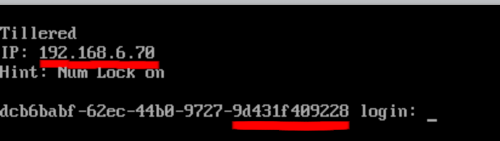
The node will configure itself to the virtual Tillered network. It may reboot during this phase, but it will be ready to use when the Tillered Hub node page shows the node as "Provisioned".