

Installation
VMware ESXi
Deploy a Tillered node on VMware ESXi
VMware ESXi is an "enterprise-class" hypervisor which allows the use of setting up Virtual Machines easily.
Prerequisites
- Ensure the node in VMware ESXi has internet access and can receive an IP via DHCP or a static IP.
- Create an account on the Tillered Hub.
- Download the VMware Disk Image from here.
Setting Up a Tillered Node
- Install a new VMware VMDK using the provided .ovf file.
- In the VM's Port Group Properties under Security:
- Set Promiscuous mode to Accept.
- Set MAC Address Changes to Accept.
- Set Forged transmits to Accept.
Register Your Node
After deploying the VM, register it with your Tillered account.
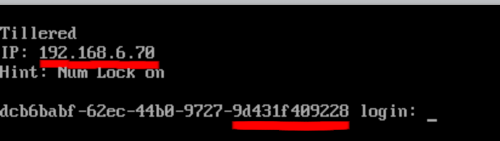
The node will configure itself to the virtual Tillered network. It may reboot during this phase, but it will be ready to use when the Tillered Hub node page shows the node as "Provisioned".